HarmonyOS开发中序列化与反序列化:Marshalling

【摘要】 HarmonyOS开发中序列化与反序列化:Marshalling数据的"打包"与"拆包",跨进程通信的必修课 一、背景与动机:为什么需要序列化? 1.1 进程隔离带来的问题想象两个进程就像两个房间,中间隔着一堵玻璃墙。你能看到对方房间里的东西,但拿不到——因为每个进程有独立的内存空间。// 进程A中的对象const player = { name: '张三', age: 25,...
HarmonyOS开发中序列化与反序列化:Marshalling
数据的"打包"与"拆包",跨进程通信的必修课
一、背景与动机:为什么需要序列化?
1.1 进程隔离带来的问题
想象两个进程就像两个房间,中间隔着一堵玻璃墙。你能看到对方房间里的东西,但拿不到——因为每个进程有独立的内存空间。
// 进程A中的对象
const player = {
    name: '张三',
    age: 25,
    scores: [90, 85, 92]
}

// 进程B想用这个对象
// ❌ 直接访问?不可能!内存地址在进程A中
// ✅ 序列化后传递!把对象"拍扁"成字节流
**序列化(Marshalling/Serialization)**就是把内存中的对象转换成可以传输的字节流。**反序列化(Unmarshalling/Deserialization)**则是相反的过程。
1.2 鸿蒙的序列化方案
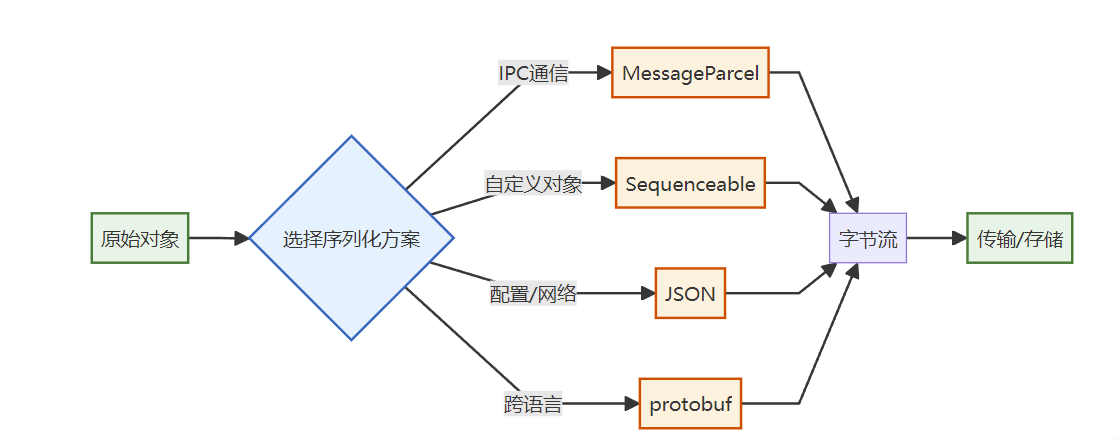
鸿蒙提供了多种序列化方案,适用于不同场景:
| 方案 | 性能 | 易用性 | 适用场景 |
|---|---|---|---|
| MessageParcel | 高 | 中 | Binder IPC通信 |
| Sequenceable | 高 | 高 | 自定义对象序列化 |
| JSON | 低 | 高 | 配置文件、网络请求 |
| protobuf | 高 | 低 | 跨语言、高性能场景 |
1.3 MessageParcel vs Sequenceable
很多开发者分不清这两个:
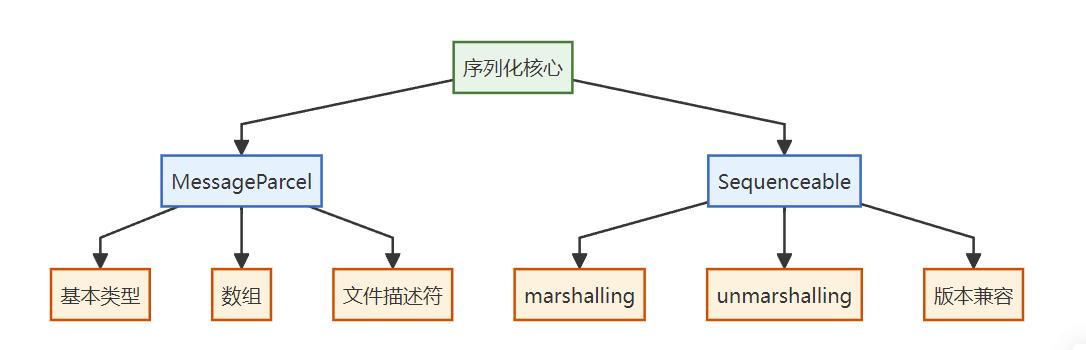
- MessageParcel:底层数据容器,提供基本类型的读写方法
- Sequenceable:接口,让自定义对象可以被MessageParcel处理
// MessageParcel:直接读写基本类型
parcel.writeInt(100)
parcel.writeString('hello')

// Sequenceable:自定义对象实现接口
class User implements Sequenceable {
    name: string
    age: number

    // 实现序列化方法
    marshalling(parcel: MessageParcel): boolean {
        parcel.writeString(this.name)
        parcel.writeInt(this.age)
        return true
    }

    // 实现反序列化方法
    unmarshalling(parcel: MessageParcel): boolean {
        this.name = parcel.readString()
        this.age = parcel.readInt()
        return true
    }
}
二、核心原理:MessageParcel内部机制
2.1 MessageParcel的结构
MessageParcel本质上是一个字节缓冲区,维护读写位置指针:
graph TB
    subgraph MessageParcel["MessageParcel结构"]
        A[数据缓冲区<br/>byte[]] --> B[写入位置<br/>writePos]
        A --> C[读取位置<br/>readPos]
        A --> D[容量<br/>capacity]
    end

    E[写入操作] -->|移动writePos| A
    F[读取操作] -->|移动readPos| A

    classDef primary fill:#e8f5e9,stroke:#2e7d32,stroke-width:2px
    classDef info fill:#e3f2fd,stroke:#1565c0,stroke-width:2px

    class A primary
    class B,C,D,E,F info
2.2 基本类型序列化
每种基本类型在MessageParcel中都有固定的存储格式:
| 类型 | 大小 | 存储格式 |
|---|---|---|
| int | 4字节 | 小端序 |
| long | 8字节 | 小端序 |
| float | 4字节 | IEEE 754 |
| double | 8字节 | IEEE 754 |
| boolean | 4字节 | 0或1 |
| string | 变长 | 长度(4字节) + UTF-8数据 |
// 内部实现伪代码
class MessageParcel {
    private buffer: Uint8Array
    private writePos: number = 0
    private readPos: number = 0

    // 写入int
    writeInt(value: number): void {
        // 小端序:低字节在前
        this.buffer[this.writePos++] = value & 0xFF
        this.buffer[this.writePos++] = (value >> 8) & 0xFF
        this.buffer[this.writePos++] = (value >> 16) & 0xFF
        this.buffer[this.writePos++] = (value >> 24) & 0xFF
    }

    // 读取int
    readInt(): number {
        const b0 = this.buffer[this.readPos++]
        const b1 = this.buffer[this.readPos++]
        const b2 = this.buffer[this.readPos++]
        const b3 = this.buffer[this.readPos++]

        // 小端序重组
        return b0 | (b1 << 8) | (b2 << 16) | (b3 << 24)
    }

    // 写入string
    writeString(value: string): void {
        const bytes = new TextEncoder().encode(value)

        // 先写入长度
        this.writeInt(bytes.length)

        // 再写入数据
        for (let i = 0; i < bytes.length; i++) {
            this.buffer[this.writePos++] = bytes[i]
        }
    }

    // 读取string
    readString(): string {
        // 先读取长度
        const length = this.readInt()

        // 再读取数据
        const bytes = this.buffer.slice(this.readPos, this.readPos + length)
        this.readPos += length

        return new TextDecoder().decode(bytes)
    }
}
2.3 复杂类型序列化
对于数组、对象等复杂类型,需要递归序列化:
// 数组序列化
writeIntArray(array: number[]): void {
    // 先写入长度
    this.writeInt(array.length)

    // 逐个写入元素
    for (const item of array) {
        this.writeInt(item)
    }
}

// 读取数组
readIntArray(): number[] {
    const length = this.readInt()
    const array: number[] = []

    for (let i = 0; i < length; i++) {
        array.push(this.readInt())
    }

    return array
}
2.4 序列化流程图
sequenceDiagram
    participant App as 应用代码
    participant Parcel as MessageParcel
    participant Buffer as 字节缓冲区

    App->>Parcel: writeInt(100)
    Parcel->>Buffer: 写入4字节 [64 00 00 00]
    Parcel->>Parcel: writePos += 4

    App->>Parcel: writeString("hello")
    Parcel->>Buffer: 写入长度 [05 00 00 00]
    Parcel->>Buffer: 写入数据 [68 65 6C 6C 6F]
    Parcel->>Parcel: writePos += 9

    App->>Parcel: readInt()
    Parcel->>Buffer: 读取4字节
    Parcel->>Parcel: readPos += 4
    Parcel-->>App: 返回 100

    App->>Parcel: readString()
    Parcel->>Buffer: 读取长度(5)
    Parcel->>Buffer: 读取5字节
    Parcel->>Parcel: readPos += 9
    Parcel-->>App: 返回 "hello"

    classDef primary fill:#e3f2fd,stroke:#1565c0,stroke-width:2px
    classDef warning fill:#fff3e0,stroke:#e65100,stroke-width:2px
    classDef success fill:#e8f5e9,stroke:#2e7d32,stroke-width:2px

    class App primary
    class Parcel warning
    class Buffer success
三、代码实战:序列化各种数据类型
3.1 基本类型序列化
// BasicTypeSerialization.ets
import { MessageParcel } from '@kit.IPCKit'
import hilog from '@ohos.hilog'

const TAG = 'BasicTypeSerialization'
const DOMAIN = 0xFF00

/**
 * 基本类型序列化示例
 */
export class BasicTypeSerialization {
    /**
     * 序列化各种基本类型
     */
    static serializeBasicTypes(): void {
        const parcel = MessageParcel.create()

        try {
            // 写入各种基本类型
            parcel.writeInt(42)                    // 整数
            parcel.writeLong(9876543210n)          // 长整数
            parcel.writeFloat(3.14)                // 单精度浮点
            parcel.writeDouble(2.718281828)        // 双精度浮点
            parcel.writeBoolean(true)              // 布尔值
            parcel.writeString('Hello HarmonyOS')  // 字符串
            parcel.writeByte(255)                  // 字节

            hilog.info(DOMAIN, TAG, `Written ${parcel.getDataSize()} bytes`)

            // 重置读取位置
            parcel.rewindRead()

            // 按相同顺序读取
            const intValue = parcel.readInt()
            const longValue = parcel.readLong()
            const floatValue = parcel.readFloat()
            const doubleValue = parcel.readDouble()
            const boolValue = parcel.readBoolean()
            const stringValue = parcel.readString()
            const byteValue = parcel.readByte()

            hilog.info(DOMAIN, TAG, `int: ${intValue}`)
            hilog.info(DOMAIN, TAG, `long: ${longValue}`)
            hilog.info(DOMAIN, TAG, `float: ${floatValue}`)
            hilog.info(DOMAIN, TAG, `double: ${doubleValue}`)
            hilog.info(DOMAIN, TAG, `boolean: ${boolValue}`)
            hilog.info(DOMAIN, TAG, `string: ${stringValue}`)
            hilog.info(DOMAIN, TAG, `byte: ${byteValue}`)

        } finally {
            parcel.reclaim()
        }
    }

    /**
     * 序列化数组
     */
    static serializeArrays(): void {
        const parcel = MessageParcel.create()

        try {
            // 整数数组
            const intArray = [1, 2, 3, 4, 5]
            parcel.writeIntArray(intArray)

            // 字符串数组
            const strArray = ['apple', 'banana', 'cherry']
            parcel.writeStringArray(strArray)

            // 字节数组
            const byteArray = new Uint8Array([0x01, 0x02, 0x03, 0x04])
            parcel.writeByteArray(byteArray)

            // 重置并读取
            parcel.rewindRead()

            const readIntArray = parcel.readIntArray()
            const readStrArray = parcel.readStringArray()
            const readByteArray = parcel.readByteArray()

            hilog.info(DOMAIN, TAG, `int array: [${readIntArray.join(', ')}]`)
            hilog.info(DOMAIN, TAG, `string array: [${readStrArray.join(', ')}]`)
            hilog.info(DOMAIN, TAG, `byte array length: ${readByteArray.length}`)

        } finally {
            parcel.reclaim()
        }
    }
}
3.2 自定义对象序列化(Sequenceable)
// User.ets - 自定义可序列化对象
import { Sequenceable, MessageParcel } from '@kit.IPCKit'

/**
 * 用户信息类
 * 实现Sequenceable接口,支持跨进程传递
 */
export class User implements Sequenceable {
    // 用户属性
    id: number = 0
    name: string = ''
    email: string = ''
    age: number = 0
    isActive: boolean = false
    tags: string[] = []

    constructor(id?: number, name?: string) {
        if (id !== undefined) this.id = id
        if (name !== undefined) this.name = name
    }

    /**
     * 序列化:将对象写入MessageParcel
     * 写入顺序必须与读取顺序一致!
     */
    marshalling(parcel: MessageParcel): boolean {
        try {
            parcel.writeInt(this.id)
            parcel.writeString(this.name)
            parcel.writeString(this.email)
            parcel.writeInt(this.age)
            parcel.writeBoolean(this.isActive)
            parcel.writeStringArray(this.tags)
            return true
        } catch (e) {
            return false
        }
    }

    /**
     * 反序列化:从MessageParcel读取数据
     * 读取顺序必须与写入顺序一致!
     */
    unmarshalling(parcel: MessageParcel): boolean {
        try {
            this.id = parcel.readInt()
            this.name = parcel.readString()
            this.email = parcel.readString()
            this.age = parcel.readInt()
            this.isActive = parcel.readBoolean()
            this.tags = parcel.readStringArray()
            return true
        } catch (e) {
            return false
        }
    }

    /**
     * 静态工厂方法:从MessageParcel创建对象
     */
    static unmarshallingFrom(parcel: MessageParcel): User {
        const user = new User()
        user.unmarshalling(parcel)
        return user
    }

    toString(): string {
        return `User{id=${this.id}, name=${this.name}, age=${this.age}}`
    }
}

// 使用示例
export function testUserSerialization(): void {
    const parcel = MessageParcel.create()

    try {
        // 创建用户对象
        const user = new User(1, '张三')
        user.email = 'zhangsan@example.com'
        user.age = 25
        user.isActive = true
        user.tags = ['developer', 'harmonyos']

        // 序列化
        parcel.writeSequenceable(user)

        // 重置读取位置
        parcel.rewindRead()

        // 反序列化
        const restored = User.unmarshallingFrom(parcel)

        hilog.info(DOMAIN, TAG, `Original: ${user.toString()}`)
        hilog.info(DOMAIN, TAG, `Restored: ${restored.toString()}`)

    } finally {
        parcel.reclaim()
    }
}
3.3 嵌套对象序列化
// ComplexObject.ets - 嵌套对象序列化
import { Sequenceable, MessageParcel } from '@kit.IPCKit'

/**
 * 地址信息
 */
export class Address implements Sequenceable {
    province: string = ''
    city: string = ''
    street: string = ''
    zipCode: string = ''

    marshalling(parcel: MessageParcel): boolean {
        parcel.writeString(this.province)
        parcel.writeString(this.city)
        parcel.writeString(this.street)
        parcel.writeString(this.zipCode)
        return true
    }

    unmarshalling(parcel: MessageParcel): boolean {
        this.province = parcel.readString()
        this.city = parcel.readString()
        this.street = parcel.readString()
        this.zipCode = parcel.readString()
        return true
    }

    static from(parcel: MessageParcel): Address {
        const addr = new Address()
        addr.unmarshalling(parcel)
        return addr
    }
}

/**
 * 订单信息(包含嵌套对象)
 */
export class Order implements Sequenceable {
    orderId: string = ''
    userId: number = 0
    amount: number = 0
    address: Address = new Address()  // 嵌套对象
    items: OrderItem[] = []           // 对象数组

    marshalling(parcel: MessageParcel): boolean {
        parcel.writeString(this.orderId)
        parcel.writeInt(this.userId)
        parcel.writeDouble(this.amount)

        // 序列化嵌套对象
        parcel.writeSequenceable(this.address)

        // 序列化对象数组
        parcel.writeInt(this.items.length)
        for (const item of this.items) {
            parcel.writeSequenceable(item)
        }

        return true
    }

    unmarshalling(parcel: MessageParcel): boolean {
        this.orderId = parcel.readString()
        this.userId = parcel.readInt()
        this.amount = parcel.readDouble()

        // 反序列化嵌套对象
        this.address = Address.from(parcel)

        // 反序列化对象数组
        const itemCount = parcel.readInt()
        this.items = []
        for (let i = 0; i < itemCount; i++) {
            const item = new OrderItem()
            item.unmarshalling(parcel)
            this.items.push(item)
        }

        return true
    }
}

/**
 * 订单项
 */
export class OrderItem implements Sequenceable {
    productId: string = ''
    productName: string = ''
    quantity: number = 0
    price: number = 0

    marshalling(parcel: MessageParcel): boolean {
        parcel.writeString(this.productId)
        parcel.writeString(this.productName)
        parcel.writeInt(this.quantity)
        parcel.writeDouble(this.price)
        return true
    }

    unmarshalling(parcel: MessageParcel): boolean {
        this.productId = parcel.readString()
        this.productName = parcel.readString()
        this.quantity = parcel.readInt()
        this.price = parcel.readDouble()
        return true
    }
}

/**
 * 测试嵌套对象序列化
 */
export function testNestedSerialization(): void {
    const parcel = MessageParcel.create()

    try {
        // 创建复杂订单对象
        const order = new Order()
        order.orderId = 'ORD-2024-001'
        order.userId = 1001
        order.amount = 299.99

        order.address.province = '广东省'
        order.address.city = '深圳市'
        order.address.street = '南山区科技园'
        order.address.zipCode = '518000'

        const item1 = new OrderItem()
        item1.productId = 'P001'
        item1.productName = '鸿蒙开发书籍'
        item1.quantity = 1
        item1.price = 99.99

        const item2 = new OrderItem()
        item2.productId = 'P002'
        item2.productName = 'Type-C数据线'
        item2.quantity = 2
        item2.price = 100.00

        order.items = [item1, item2]

        // 序列化
        parcel.writeSequenceable(order)

        hilog.info(DOMAIN, TAG, `Serialized order, size: ${parcel.getDataSize()} bytes`)

        // 反序列化
        parcel.rewindRead()
        const restored = new Order()
        restored.unmarshalling(parcel)

        hilog.info(DOMAIN, TAG, `Order ID: ${restored.orderId}`)
        hilog.info(DOMAIN, TAG, `Address: ${restored.address.city}`)
        hilog.info(DOMAIN, TAG, `Items: ${restored.items.length}`)

    } finally {
        parcel.reclaim()
    }
}
3.4 文件描述符传递
// FileDescriptorTransfer.ets
import { MessageParcel } from '@kit.IPCKit'
import fs from '@ohos.file.fs'
import hilog from '@ohos.hilog'

const TAG = 'FDTransfer'
const DOMAIN = 0xFF00

/**
 * 文件描述符传递示例
 * 通过Binder传递文件,无需拷贝数据
 */
export class FileDescriptorTransfer {
    /**
     * 写入端:将文件描述符写入MessageParcel
     */
    static writeFileDescriptor(parcel: MessageParcel, filePath: string): void {
        // 打开文件
        const file = fs.openSync(filePath, fs.OpenMode.READ_ONLY)

        // 写入文件描述符
        parcel.writeFileDescriptor(file.fd)

        hilog.info(DOMAIN, TAG, `Written file descriptor: ${file.fd}`)

        // 注意:不要关闭文件!接收方需要使用这个fd
        // 文件会在接收方关闭时自动关闭
    }

    /**
     * 读取端:从MessageParcel读取文件描述符
     */
    static readFileDescriptor(parcel: MessageParcel): void {
        // 读取文件描述符
        const fd = parcel.readFileDescriptor()

        hilog.info(DOMAIN, TAG, `Received file descriptor: ${fd}`)

        // 使用文件描述符读取内容
        const stat = fs.statSync(fd)
        hilog.info(DOMAIN, TAG, `File size: ${stat.size} bytes`)

        // 读取文件内容
        const buffer = new ArrayBuffer(1024)
        const readLen = fs.readSync(fd, buffer)

        hilog.info(DOMAIN, TAG, `Read ${readLen} bytes from file`)

        // 关闭文件
        fs.closeSync(fd)
    }

    /**
     * 完整示例:传递文件并读取
     */
    static async transferFileDemo(): Promise<void> {
        const parcel = MessageParcel.create()

        try {
            // 创建测试文件
            const testFile = '/data/local/tmp/test_transfer.txt'
            const file = fs.openSync(testFile, fs.OpenMode.CREATE | fs.OpenMode.WRITE_ONLY)
            fs.writeSync(file.fd, 'Hello from file descriptor transfer!')
            fs.closeSync(file)

            // 写入文件描述符
            this.writeFileDescriptor(parcel, testFile)

            // 重置读取位置
            parcel.rewindRead()

            // 读取文件描述符
            this.readFileDescriptor(parcel)

        } finally {
            parcel.reclaim()
        }
    }
}
四、踩坑与注意事项
4.1 坑一:读写顺序不一致
问题:最常见的错误,读写顺序必须完全一致。
// ❌ 错误示范
// 写入顺序:int, string, boolean
parcel.writeInt(100)
parcel.writeString('hello')
parcel.writeBoolean(true)

// 读取顺序错误:string, int, boolean
const str = parcel.readString()  // 读到的是int的字节!
const num = parcel.readInt()     // 读到的是string的一部分!
const flag = parcel.readBoolean()

// ✅ 正确做法:严格保持顺序一致
parcel.rewindRead()
const num = parcel.readInt()      // 100
const str = parcel.readString()   // 'hello'
const flag = parcel.readBoolean() // true
4.2 坑二:忘记重置读取位置
问题:写入后直接读取会失败,因为读取位置在末尾。
// ❌ 错误示范
parcel.writeInt(100)
parcel.writeInt(200)

// 直接读取?读不到东西!
const value = parcel.readInt()  // 读取位置已在末尾

// ✅ 正确做法:重置读取位置
parcel.rewindRead()  // 或 parcel.setDataPosition(0)
const value1 = parcel.readInt()  // 100
const value2 = parcel.readInt()  // 200
4.3 坑三:空值处理
问题:null/undefined需要特殊处理。
// ❌ 直接写入null可能出错
parcel.writeString(null)  // 可能抛异常

// ✅ 方案1:写入标志位
function writeNullableString(parcel: MessageParcel, value: string | null): void {
    if (value === null) {
        parcel.writeBoolean(false)  // null标志
    } else {
        parcel.writeBoolean(true)   // 非null标志
        parcel.writeString(value)
    }
}

function readNullableString(parcel: MessageParcel): string | null {
    const hasValue = parcel.readBoolean()
    if (hasValue) {
        return parcel.readString()
    }
    return null
}

// ✅ 方案2:使用空字符串表示null
function writeStringSafe(parcel: MessageParcel, value: string | null): void {
    parcel.writeString(value ?? '')
}

function readStringSafe(parcel: MessageParcel): string | null {
    const value = parcel.readString()
    return value === '' ? null : value
}
4.4 坑四:循环引用
问题:对象间循环引用会导致无限递归。
// ❌ 循环引用
class Node {
    value: number
    next: Node  // 可能形成环

    marshalling(parcel: MessageParcel): boolean {
        parcel.writeInt(this.value)
        parcel.writeSequenceable(this.next)  // 如果next指向自己,无限递归!
        return true
    }
}

// ✅ 方案:使用ID引用代替对象引用
class Node implements Sequenceable {
    id: number
    value: number
    nextId: number | null  // 只存储ID

    marshalling(parcel: MessageParcel): boolean {
        parcel.writeInt(this.id)
        parcel.writeInt(this.value)
        parcel.writeInt(this.nextId ?? -1)
        return true
    }
}

// 反序列化后通过ID查找引用
class NodeList {
    nodes: Map<number, Node> = new Map()

    getNode(id: number): Node | null {
        return this.nodes.get(id) ?? null
    }
}
4.5 坑五:版本兼容性
问题:数据结构变更后,旧数据无法正确反序列化。
// ✅ 方案:添加版本号
class UserV2 implements Sequenceable {
    version: number = 2  // 版本号

    // V1字段
    id: number = 0
    name: string = ''

    // V2新增字段
    nickname: string = ''
    avatar: string = ''

    marshalling(parcel: MessageParcel): boolean {
        parcel.writeInt(this.version)
        parcel.writeInt(this.id)
        parcel.writeString(this.name)
        parcel.writeString(this.nickname)
        parcel.writeString(this.avatar)
        return true
    }

    unmarshalling(parcel: MessageParcel): boolean {
        const version = parcel.readInt()

        this.id = parcel.readInt()
        this.name = parcel.readString()

        // 根据版本号读取不同字段
        if (version >= 2) {
            this.nickname = parcel.readString()
            this.avatar = parcel.readString()
        } else {
            // V1数据,设置默认值
            this.nickname = this.name
            this.avatar = ''
        }

        return true
    }
}
五、HarmonyOS 6适配指南
5.1 API变更
| 变更项 | HarmonyOS 5 | HarmonyOS 6 |
|---|---|---|
| 创建方式 | new MessageParcel() |
MessageParcel.create() |
| 释放方式 | 无需手动释放 | 必须调用reclaim() |
| 容量管理 | 固定容量 | 动态扩容ensureCapacity() |
| 性能统计 | 无 | 新增getWritePosition()/getReadPosition() |
5.2 性能优化API
// HarmonyOS 6新增:容量预分配
const parcel = MessageParcel.create()

// 预分配足够容量,避免动态扩容
parcel.ensureCapacity(4096)  // 预分配4KB

// 批量写入
const data = [1, 2, 3, 4, 5, 6, 7, 8, 9, 10]
parcel.writeIntArray(data)

// 获取写入统计
hilog.info(DOMAIN, TAG, `Write position: ${parcel.getWritePosition()}`)
hilog.info(DOMAIN, TAG, `Data size: ${parcel.getDataSize()} bytes`)

// HarmonyOS 6新增:原始字节访问
const rawBytes = parcel.getRawData()
hilog.info(DOMAIN, TAG, `Raw bytes length: ${rawBytes.length}`)
5.3 兼容性工具类
// ParcelCompat.ets - 兼容HarmonyOS 5和6
import { MessageParcel } from '@kit.IPCKit'

export class ParcelCompat {
    /**
     * 创建MessageParcel(兼容两个版本)
     */
    static create(): MessageParcel {
        if (typeof MessageParcel.create === 'function') {
            return MessageParcel.create()
        }
        // @ts-ignore - HarmonyOS 5兼容
        return new MessageParcel()
    }

    /**
     * 安全释放
     */
    static reclaim(parcel: MessageParcel): void {
        if (parcel && typeof parcel.reclaim === 'function') {
            parcel.reclaim()
        }
    }

    /**
     * 写入可空值
     */
    static writeNullable<T>(
        parcel: MessageParcel,
        value: T | null,
        writer: (parcel: MessageParcel, value: T) => void
    ): void {
        if (value === null) {
            parcel.writeBoolean(false)
        } else {
            parcel.writeBoolean(true)
            writer(parcel, value)
        }
    }

    /**
     * 读取可空值
     */
    static readNullable<T>(
        parcel: MessageParcel,
        reader: (parcel: MessageParcel) => T
    ): T | null {
        const hasValue = parcel.readBoolean()
        return hasValue ? reader(parcel) : null
    }
}

// 使用示例
const parcel = ParcelCompat.create()

try {
    // 写入可空字符串
    ParcelCompat.writeNullable(parcel, 'hello', (p, v) => p.writeString(v))
    ParcelCompat.writeNullable(parcel, null, (p, v) => p.writeString(v))

    parcel.rewindRead()

    // 读取可空字符串
    const str1 = ParcelCompat.readNullable(parcel, p => p.readString())
    const str2 = ParcelCompat.readNullable(parcel, p => p.readString())

    hilog.info(DOMAIN, TAG, `str1: ${str1}, str2: ${str2}`)

} finally {
    ParcelCompat.reclaim(parcel)
}
六、总结
6.1 核心要点回顾
6.2 最佳实践清单
- [ ] 读写顺序严格一致
- [ ] 写入后重置读取位置
- [ ] 正确处理null值
- [ ] 避免循环引用
- [ ] 添加版本号保证兼容性
- [ ] 使用try-finally确保资源释放
- [ ] 预分配容量避免动态扩容
- [ ] 使用兼容工具类适配多版本
6.3 性能优化建议
| 优化项 | 方法 |
|---|---|
| 减少内存分配 | ensureCapacity()预分配 |
| 避免数据拷贝 | 使用文件描述符传递大文件 |
| 批量操作 | 使用数组写入方法 |
| 减少序列化次数 | 缓存已序列化数据 |
下一篇预告:《事件驱动:CommonEvent与EventHandler》——掌握鸿蒙的事件驱动编程模型。

【声明】本内容来自华为云开发者社区博主,不代表华为云及华为云开发者社区的观点和立场。转载时必须标注文章的来源(华为云社区)、文章链接、文章作者等基本信息,否则作者和本社区有权追究责任。如果您发现本社区中有涉嫌抄袭的内容,欢迎发送邮件进行举报,并提供相关证据,一经查实,本社区将立刻删除涉嫌侵权内容,举报邮箱:
cloudbbs@huaweicloud.com
- 点赞
- 收藏
- 关注作者
评论(0)