数据结构与算法之符号表

【摘要】
符号表简介
符号表最主要的目的就是将一个键和一个值联系起来,符号表能够将存储的数据元素是一个键和一个值共同组成的键值对数据,我们可以根据键来查找对应的值。
符号表中,键具有唯一性。 符号表在实际生活...
符号表简介
符号表最主要的目的就是将一个键和一个值联系起来,符号表能够将存储的数据元素是一个键和一个值共同组成的键值对数据,我们可以根据键来查找对应的值。
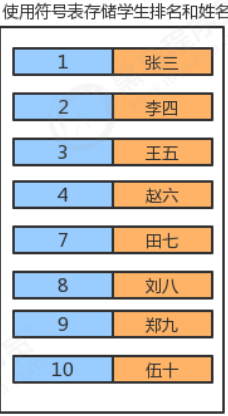
符号表中,键具有唯一性。
符号表在实际生活中的使用场景是非常广泛的,见下表:
| 应用 | 查找目的 | 键 | 值 |
|---|---|---|---|
| 字典 | 找出单词的释义 | 单词 | 释义 |
| 图书索引 | 找出某个术语相关的页码 | 术语 | 一串页码 |
| 网络搜索 | 找出某个关键字对应的网页 | 关键字 | 网页名称 |
符号表API设计
结点类:
| 类名 | Node<Key,Value> |
|---|---|
| 构造方法 | Node(Key key,Value value,Node next):创建Node对象 |
| 成员变量 | 1.public Key key:存储键 2.public Value value:存储值 3.public Node next:存储下一个结点 |
符号表:
| 类名 | SymbolTable<Key,Value> |
|---|---|
| 构造方法 | SymbolTable():创建SymbolTable对象 |
| 成员方法 | 1.public Value get(Key key):根据键key,找对应的值 2.public void put(Key key,Value val):向符号表中插入一个键值对 3.public void delete(Key key):删除键为key的键值对 4.public int size():获取符号表的大小 |
| 成员变量 | 1.private Node head:记录首结点 2.private int N:记录符号表中键值对的个数 |
符号表实现
// 符号表
public class SymbolTable<Key,Value> {
	//记录首结点
	private Node head;
	//记录符号表中元素的个数
	private int N;
	public SymbolTable() {
		head = new Node(null,null,null);
		N=0;
	}
	//获取符号表中键值对的个数
	public int size(){
		return N;
	}
	//往符号表中插入键值对
	public void put(Key key,Value value){
		//先从符号表中查找键为key的键值对
		Node n = head;
		while(n.next!=null){
			n = n.next;
			if (n.key.equals(key)){
				n.value=value;
				return;
			}
		}
		//符号表中没有键为key的键值对
		Node oldFirst = head.next;
		Node newFirst = new Node(key,value,oldFirst);
		head.next = newFirst;
		//个数+1
		N++;
	}
	//删除符号表中键为key的键值对
	public void delete(Key key){
		Node n = head;
		while(n.next!=null){
			if (n.next.key.equals(key)){
				n.next = n.next.next;
				N--;
				return;
			}
		n = n.next;
		}
	}
	//从符号表中获取key对应的值
	public Value get(Key key){
		Node n = head;
		while(n.next!=null){
			n = n.next;
			if (n.key.equals(key)){
				return n.value;
			}
		}
		return null;
	}
	private class Node{
		//键
		public Key key;
		//值
		public Value value;
		//下一个结点
		public Node next;
		public Node(Key key, Value value, Node next) {
			this.key = key;
			this.value = value;
			this.next = next;
		}
	}
}
//测试类
public class Test {
	public static void main(String[] args) throws Exception {
		SymbolTable<Integer, String> st = new SymbolTable<>();
		st.put(1, "张三");
		st.put(3, "李四");
		st.put(5, "王五");
		System.out.println(st.size());
		st.put(1,"老三");
		System.out.println(st.get(1));
		System.out.println(st.size());
		st.delete(1);
		System.out.println(st.size());
	}
}
- 1
- 2
- 3
- 4
- 5
- 6
- 7
- 8
- 9
- 10
- 11
- 12
- 13
- 14
- 15
- 16
- 17
- 18
- 19
- 20
- 21
- 22
- 23
- 24
- 25
- 26
- 27
- 28
- 29
- 30
- 31
- 32
- 33
- 34
- 35
- 36
- 37
- 38
- 39
- 40
- 41
- 42
- 43
- 44
- 45
- 46
- 47
- 48
- 49
- 50
- 51
- 52
- 53
- 54
- 55
- 56
- 57
- 58
- 59
- 60
- 61
- 62
- 63
- 64
- 65
- 66
- 67
- 68
- 69
- 70
- 71
- 72
- 73
- 74
- 75
- 76
- 77
- 78
- 79
- 80
- 81
- 82
- 83
- 84
有序符号表
刚才实现的符号表,我们可以称之为无序符号表,因为在插入的时候,并没有考虑键值对的顺序,而在实际生活中,有时候我们需要根据键的大小进行排序,插入数据时要考虑顺序,那么接下来我们就实现一下有序符号表。
//有序符号表
public class OrderSymbolTable<Key extends Comparable<Key>,Value> {
	//记录首结点
	private Node head;
	//记录符号表中元素的个数
	private int N;
	public OrderSymbolTable() {
		head = new Node(null,null,null);
		N=0;
	}
	//获取符号表中键值对的个数
	public int size(){
		return N;
	}
	//往符号表中插入键值对
	public void put(Key key,Value value){
		//记录当前结点
		Node curr = head.next;
		//记录上一个结点
		Node pre = head;
		//1.如果key大于当前结点的key,则一直寻找下一个结点
		while(curr!=null && key.compareTo(curr.key)>0){
			pre = curr;
			curr = curr.next;
		}
		//2.如果当前结点curr的key和将要插入的key一样,则替换
		if (curr!=null && curr.key.compareTo(key)==0){
			curr.value=value;
			return;
		}
		//3.没有找到相同的key,把新结点插入到curr之前
		Node newNode = new Node(key, value, curr);
		pre.next = newNode;
	}
	//删除符号表中键为key的键值对
	public void delete(Key key){
		Node n = head;
		while(n.next!=null){
			if (n.next.key.equals(key)){
				n.next = n.next.next;
				N--;
				return;
			}
		n = n.next;
		}
	}
	//从符号表中获取key对应的值
	public Value get(Key key){
		Node n = head;
		while(n.next!=null){
			n = n.next;
			if (n.key.equals(key)){
				return n.value;
			}
		}
		return null;
	}
	private class Node{
		//键
		public Key key;
		//值
		public Value value;
		//下一个结点
		public Node next;
		public Node(Key key, Value value, Node next) {
			this.key = key;
			this.value = value;
			this.next = next;
		}
	}
}
//测试代码
public class Test {
	public static void main(String[] args) throws Exception {
		OrderSymbolTable<Integer, String> bt = new OrderSymbolTable<>();
		bt.put(4, "二哈");
		bt.put(3, "张三");
		bt.put(1, "李四");
		bt.put(1, "aa");
		bt.put(5, "王五");
	}
}
- 1
- 2
- 3
- 4
- 5
- 6
- 7
- 8
- 9
- 10
- 11
- 12
- 13
- 14
- 15
- 16
- 17
- 18
- 19
- 20
- 21
- 22
- 23
- 24
- 25
- 26
- 27
- 28
- 29
- 30
- 31
- 32
- 33
- 34
- 35
- 36
- 37
- 38
- 39
- 40
- 41
- 42
- 43
- 44
- 45
- 46
- 47
- 48
- 49
- 50
- 51
- 52
- 53
- 54
- 55
- 56
- 57
- 58
- 59
- 60
- 61
- 62
- 63
- 64
- 65
- 66
- 67
- 68
- 69
- 70
- 71
- 72
- 73
- 74
- 75
- 76
- 77
- 78
- 79
- 80
- 81
- 82
文章来源: baidaguo.blog.csdn.net,作者:白大锅,版权归原作者所有,如需转载,请联系作者。
原文链接:baidaguo.blog.csdn.net/article/details/121156891

【版权声明】本文为华为云社区用户转载文章,如果您发现本社区中有涉嫌抄袭的内容,欢迎发送邮件进行举报,并提供相关证据,一经查实,本社区将立刻删除涉嫌侵权内容,举报邮箱:
cloudbbs@huaweicloud.com
- 点赞
- 收藏
- 关注作者
评论(0)