Qt&Vtk-014-CustomLinkView

【摘要】
这个Demo已经拖了好久好久了,今天整理文章的时候,发现躲不过了呀,前面的几篇都发出了。
文章目录
1 官方示例展示2 官方源码2.1CustomLinkView.h2.2 Custom...

这个Demo已经拖了好久好久了,今天整理文章的时候,发现躲不过了呀,前面的几篇都发出了。
1 官方示例展示
啊呀,今天终于更新到这里了,一直拖延症到现在,还是没有弄明白这个项目是干啥的。仅仅展示官方代码,在项目中建了对应的文件。不要给我寄刀片哈。

点击打开按钮,显示让我打开一个XML文档,实在搞不懂这个项目是干啥的。

2 官方源码
2.1CustomLinkView.h
#ifndef CustomLinkView_H
#define CustomLinkView_H

#include "vtkSmartPointer.h"    // Required for smart pointer internal ivars.

#include <QMainWindow>

// Forward Qt class declarations
class Ui_CustomLinkView;

// Forward VTK class declarations
class vtkCommand;
class vtkEventQtSlotConnect;
class vtkGraphLayoutView;
class vtkObject;
class vtkQtTableView;
class vtkQtTreeView;
class vtkXMLTreeReader;

class CustomLinkView : public QMainWindow
{
  Q_OBJECT

public:

  // Constructor/Destructor
  CustomLinkView();
  ~CustomLinkView() override;

public slots:

  virtual void slotOpenXMLFile();
  virtual void slotExit();

protected:

protected slots:

public slots:
  // Qt signal (produced by vtkEventQtSlotConnect) will be connected to
  // this slot.
  // Full signature of the slot could be:
  // MySlot(vtkObject* caller, unsigned long vtk_event,
 //         void* clientData, void* callData, vtkCommand*)
  void selectionChanged(vtkObject*, unsigned long, void*, void* callData);

private:

  // Methods
  void SetupCustomLink();


  // Members
  vtkSmartPointer<vtkXMLTreeReader>       XMLReader;
  vtkSmartPointer<vtkGraphLayoutView>     GraphView;
  vtkSmartPointer<vtkQtTreeView>          TreeView;
  vtkSmartPointer<vtkQtTableView>         TableView;
  vtkSmartPointer<vtkQtTreeView>          ColumnView;

  // This class converts a vtkEvent to QT signal.
  vtkSmartPointer<vtkEventQtSlotConnect>  Connections;

  // Designer form
  Ui_CustomLinkView *ui;
};

#endif // CustomLinkView_H
- 1
- 2
- 3
- 4
- 5
- 6
- 7
- 8
- 9
- 10
- 11
- 12
- 13
- 14
- 15
- 16
- 17
- 18
- 19
- 20
- 21
- 22
- 23
- 24
- 25
- 26
- 27
- 28
- 29
- 30
- 31
- 32
- 33
- 34
- 35
- 36
- 37
- 38
- 39
- 40
- 41
- 42
- 43
- 44
- 45
- 46
- 47
- 48
- 49
- 50
- 51
- 52
- 53
- 54
- 55
- 56
- 57
- 58
- 59
- 60
- 61
- 62
- 63
- 64
- 65
- 66
- 67
2.2 CustomLinkView.cpp
#include "ui_CustomLinkView.h"
#include "CustomLinkView.h"

#include <vtkAnnotationLink.h>
#include <vtkCommand.h>
#include <vtkDataObjectToTable.h>
#include <vtkDataRepresentation.h>
#include <vtkEventQtSlotConnect.h>
#include "vtkGenericOpenGLRenderWindow.h"
#include <vtkGraphLayoutView.h>
#include <vtkQtTableView.h>
#include <vtkQtTreeView.h>
#include <vtkRenderer.h>
#include <vtkSelection.h>
#include <vtkSelectionNode.h>
#include <vtkTable.h>
#include <vtkTableToGraph.h>
#include <vtkTreeLayoutStrategy.h>
#include <vtkViewTheme.h>
#include <vtkViewUpdater.h>
#include <vtkXMLTreeReader.h>


#include <QDir>
#include <QFileDialog>
#include <QTreeView>

#include "vtkSmartPointer.h"
#define VTK_CREATE(type, name) \
  vtkSmartPointer<type> name = vtkSmartPointer<type>::New()

// Constructor
CustomLinkView::CustomLinkView()
{
  this->ui = new Ui_CustomLinkView;
  this->ui->setupUi(this);
  vtkNew<vtkGenericOpenGLRenderWindow> renderWindow;
  this->ui->vtkGraphViewWidget->SetRenderWindow(renderWindow);


  this->XMLReader    = vtkSmartPointer<vtkXMLTreeReader>::New();
  this->GraphView    = vtkSmartPointer<vtkGraphLayoutView>::New();
  this->TreeView     = vtkSmartPointer<vtkQtTreeView>::New();
  this->TableView    = vtkSmartPointer<vtkQtTableView>::New();
  this->ColumnView   = vtkSmartPointer<vtkQtTreeView>::New();
  this->ColumnView->SetUseColumnView(1);

  // Tell the table view to sort selections that it receives (but does
  // not initiate) to the top
  this->TableView->SetSortSelectionToTop(true);

  // Set widgets for the tree and table views
  this->ui->treeFrame->layout()->addWidget(this->TreeView->GetWidget());
  this->ui->tableFrame->layout()->addWidget(this->TableView->GetWidget());
  this->ui->columnFrame->layout()->addWidget(this->ColumnView->GetWidget());

  // Graph View needs to get my render window
  this->GraphView->SetInteractor(
    this->ui->vtkGraphViewWidget->GetInteractor());

  this->GraphView->SetRenderWindow(
    this->ui->vtkGraphViewWidget->GetRenderWindow());

  // Set up the theme on the graph view :)
  vtkViewTheme* theme = vtkViewTheme::CreateNeonTheme();
  this->GraphView->ApplyViewTheme(theme);
  theme->Delete();

  // Set up action signals and slots
  connect(this->ui->actionOpenXMLFile, SIGNAL(triggered()), this,
    SLOT(slotOpenXMLFile()));
  connect(this->ui->actionExit, SIGNAL(triggered()), this,
    SLOT(slotExit()));

  // Apply application stylesheet
  QString css =
    "* { font: bold italic 18px \"Calibri\"; color: midnightblue }";
  css +=
    "QTreeView { font: bold italic 16px \"Calibri\"; color: midnightblue }";
  //qApp->setStyleSheet(css); // Seems to cause a bug on some systems
                              // But at least it's here as an example

  this->GraphView->Render();
};

// Set up the annotation between the vtk and qt views
void CustomLinkView::SetupCustomLink()
{
  this->TreeView->GetRepresentation()->SetSelectionType(
    vtkSelectionNode::PEDIGREEIDS);
  this->TableView->GetRepresentation()->SetSelectionType(
    vtkSelectionNode::PEDIGREEIDS);
  this->ColumnView->GetRepresentation()->SetSelectionType(
    vtkSelectionNode::PEDIGREEIDS);
  this->GraphView->GetRepresentation()->SetSelectionType(
    vtkSelectionNode::PEDIGREEIDS);

  // Set up the theme on the graph view :)
  vtkViewTheme* theme = vtkViewTheme::CreateNeonTheme();
  this->GraphView->ApplyViewTheme(theme);
  this->GraphView->Update();
  theme->Delete();

  // Create vtkEventQtSlotConnect and make the connections.
  Connections = vtkEventQtSlotConnect::New();

  // Make the connection here.
  // Requires vtkObject which generates the event of type
  // vtkCommand::SelectionChangedEvent, pointer to object
  // which has the given slot. vtkEvent of type SelectionChangedEvent
  // from reach representation should invoke selectionChanged.
  Connections->Connect(
    this->GraphView->GetRepresentation(),
    vtkCommand::SelectionChangedEvent,
    this,
    SLOT(selectionChanged(vtkObject*, unsigned long, void*, void*)));

  Connections->Connect(
    this->TreeView->GetRepresentation(),
    vtkCommand::SelectionChangedEvent,
    this,
    SLOT(selectionChanged(vtkObject*, unsigned long, void*, void*)));

  Connections->Connect(
    this->TableView->GetRepresentation(),
    vtkCommand::SelectionChangedEvent,
    this,
    SLOT(selectionChanged(vtkObject*, unsigned long, void*, void*)));

  Connections->Connect(
    this->ColumnView->GetRepresentation(),
    vtkCommand::SelectionChangedEvent,
    this,
    SLOT(selectionChanged(vtkObject*, unsigned long, void*, void*)));

}

CustomLinkView::~CustomLinkView()
{

}

// Action to be taken upon graph file open
void CustomLinkView::slotOpenXMLFile()
{
  // Browse for and open the file
  QDir dir;

  // Open the text data file
  QString fileName = QFileDialog::getOpenFileName(
    this,
    "Select the text data file",
    QDir::homePath(),
    "XML Files (*.xml);;All Files (*.*)");

  if (fileName.isNull())
  {
    cerr << "Could not open file" << endl;
    return;
  }

  // Create XML reader
  this->XMLReader->SetFileName( fileName.toLatin1() );
  this->XMLReader->ReadTagNameOff();
  this->XMLReader->Update();

  // Set up some hard coded parameters for the graph view
  this->GraphView->SetVertexLabelArrayName("id");
  this->GraphView->VertexLabelVisibilityOn();
  this->GraphView->SetVertexColorArrayName("VertexDegree");
  this->GraphView->ColorVerticesOn();
  this->GraphView->SetEdgeColorArrayName("edge id");
  this->GraphView->ColorEdgesOn();

  // Create a tree layout strategy
  VTK_CREATE(vtkTreeLayoutStrategy, treeStrat);
  treeStrat->RadialOn();
  treeStrat->SetAngle(360);
  treeStrat->SetLogSpacingValue(1);
  this->GraphView->SetLayoutStrategy(treeStrat);


  // Set the input to the graph view
  this->GraphView->SetRepresentationFromInputConnection(
    this->XMLReader->GetOutputPort());

  // Okay now do an explicit reset camera so that
  // the user doesn't have to move the mouse
  // in the window to see the resulting graph
  this->GraphView->ResetCamera();

  // Now hand off tree to the tree view
  this->TreeView->SetRepresentationFromInputConnection(
    this->XMLReader->GetOutputPort());
  this->ColumnView->SetRepresentationFromInputConnection(
    this->XMLReader->GetOutputPort());

  // Extract a table and give to table view
  VTK_CREATE(vtkDataObjectToTable, toTable);
  toTable->SetInputConnection(this->XMLReader->GetOutputPort());
  toTable->SetFieldType(vtkDataObjectToTable::VERTEX_DATA);
  this->TableView->SetRepresentationFromInputConnection(
    toTable->GetOutputPort());

  this->SetupCustomLink();

  // Hide an unwanted column in the tree view.
  this->TreeView->HideColumn(2);

  // Turn on some colors.
  this->TreeView->SetColorArrayName("vertex id");
  this->TreeView->ColorByArrayOn();

  // Update all the views
  this->TreeView->Update();
  this->TableView->Update();
  this->ColumnView->Update();


  // Force a render on the graph view
  this->GraphView->Render();
}

void CustomLinkView::slotExit()
{
  qApp->exit();
}

// This defines the QT slot. They way it works is first get the vtkSelection,
// push it to the default vtkAnnotationLink associated with each
// vtkDataRepresentation of each view type and then call Update or
// Render (if it is a vtkRenderView) on each view.
void CustomLinkView::selectionChanged(vtkObject*,
                                      unsigned long,
                                      void* vtkNotUsed(clientData),
                                      void* callData)
{
  vtkSelection* selection = reinterpret_cast<vtkSelection*>(callData);
  if(selection)
  {
    this->GraphView->GetRepresentation()->GetAnnotationLink()->
      SetCurrentSelection(selection);
    this->TreeView->GetRepresentation()->GetAnnotationLink()->
      SetCurrentSelection(selection);
    this->TableView->GetRepresentation()->GetAnnotationLink()->
      SetCurrentSelection(selection);
    this->ColumnView->GetRepresentation()->GetAnnotationLink()->
      SetCurrentSelection(selection);

    this->TreeView->Update();
    this->TableView->Update();
    this->ColumnView->Update();

    this->GraphView->Render();
  }
}
- 1
- 2
- 3
- 4
- 5
- 6
- 7
- 8
- 9
- 10
- 11
- 12
- 13
- 14
- 15
- 16
- 17
- 18
- 19
- 20
- 21
- 22
- 23
- 24
- 25
- 26
- 27
- 28
- 29
- 30
- 31
- 32
- 33
- 34
- 35
- 36
- 37
- 38
- 39
- 40
- 41
- 42
- 43
- 44
- 45
- 46
- 47
- 48
- 49
- 50
- 51
- 52
- 53
- 54
- 55
- 56
- 57
- 58
- 59
- 60
- 61
- 62
- 63
- 64
- 65
- 66
- 67
- 68
- 69
- 70
- 71
- 72
- 73
- 74
- 75
- 76
- 77
- 78
- 79
- 80
- 81
- 82
- 83
- 84
- 85
- 86
- 87
- 88
- 89
- 90
- 91
- 92
- 93
- 94
- 95
- 96
- 97
- 98
- 99
- 100
- 101
- 102
- 103
- 104
- 105
- 106
- 107
- 108
- 109
- 110
- 111
- 112
- 113
- 114
- 115
- 116
- 117
- 118
- 119
- 120
- 121
- 122
- 123
- 124
- 125
- 126
- 127
- 128
- 129
- 130
- 131
- 132
- 133
- 134
- 135
- 136
- 137
- 138
- 139
- 140
- 141
- 142
- 143
- 144
- 145
- 146
- 147
- 148
- 149
- 150
- 151
- 152
- 153
- 154
- 155
- 156
- 157
- 158
- 159
- 160
- 161
- 162
- 163
- 164
- 165
- 166
- 167
- 168
- 169
- 170
- 171
- 172
- 173
- 174
- 175
- 176
- 177
- 178
- 179
- 180
- 181
- 182
- 183
- 184
- 185
- 186
- 187
- 188
- 189
- 190
- 191
- 192
- 193
- 194
- 195
- 196
- 197
- 198
- 199
- 200
- 201
- 202
- 203
- 204
- 205
- 206
- 207
- 208
- 209
- 210
- 211
- 212
- 213
- 214
- 215
- 216
- 217
- 218
- 219
- 220
- 221
- 222
- 223
- 224
- 225
- 226
- 227
- 228
- 229
- 230
- 231
- 232
- 233
- 234
- 235
- 236
- 237
- 238
- 239
- 240
- 241
- 242
- 243
- 244
- 245
- 246
- 247
- 248
- 249
- 250
- 251
- 252
- 253
- 254
- 255
- 256
- 257
★ 源码 ★
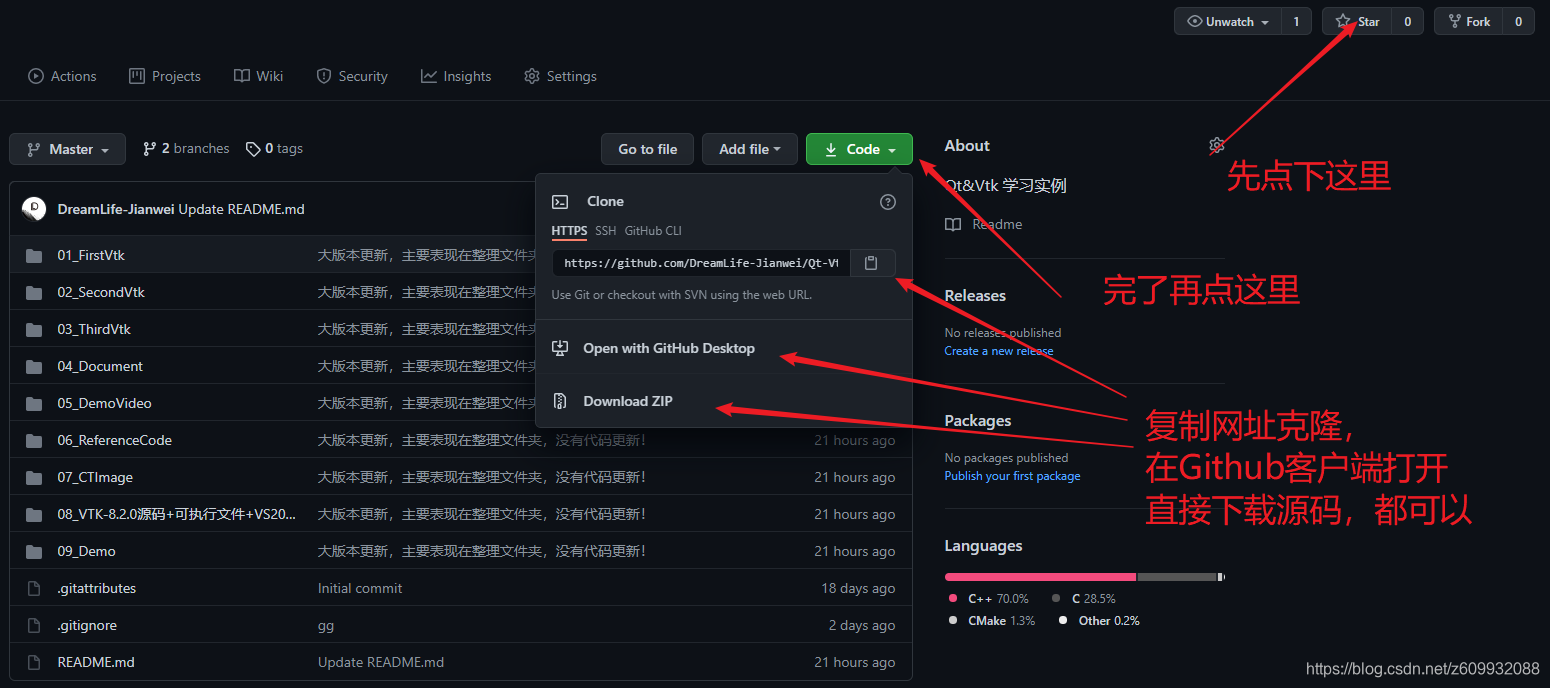
源码分享一时爽,一直分享一直爽, 链接如下:

文章来源: dreamlife.blog.csdn.net,作者:DreamLife.,版权归原作者所有,如需转载,请联系作者。
原文链接:dreamlife.blog.csdn.net/article/details/119632280

【版权声明】本文为华为云社区用户转载文章,如果您发现本社区中有涉嫌抄袭的内容,欢迎发送邮件进行举报,并提供相关证据,一经查实,本社区将立刻删除涉嫌侵权内容,举报邮箱:
cloudbbs@huaweicloud.com
- 点赞
- 收藏
- 关注作者
评论(0)